Agent tabs
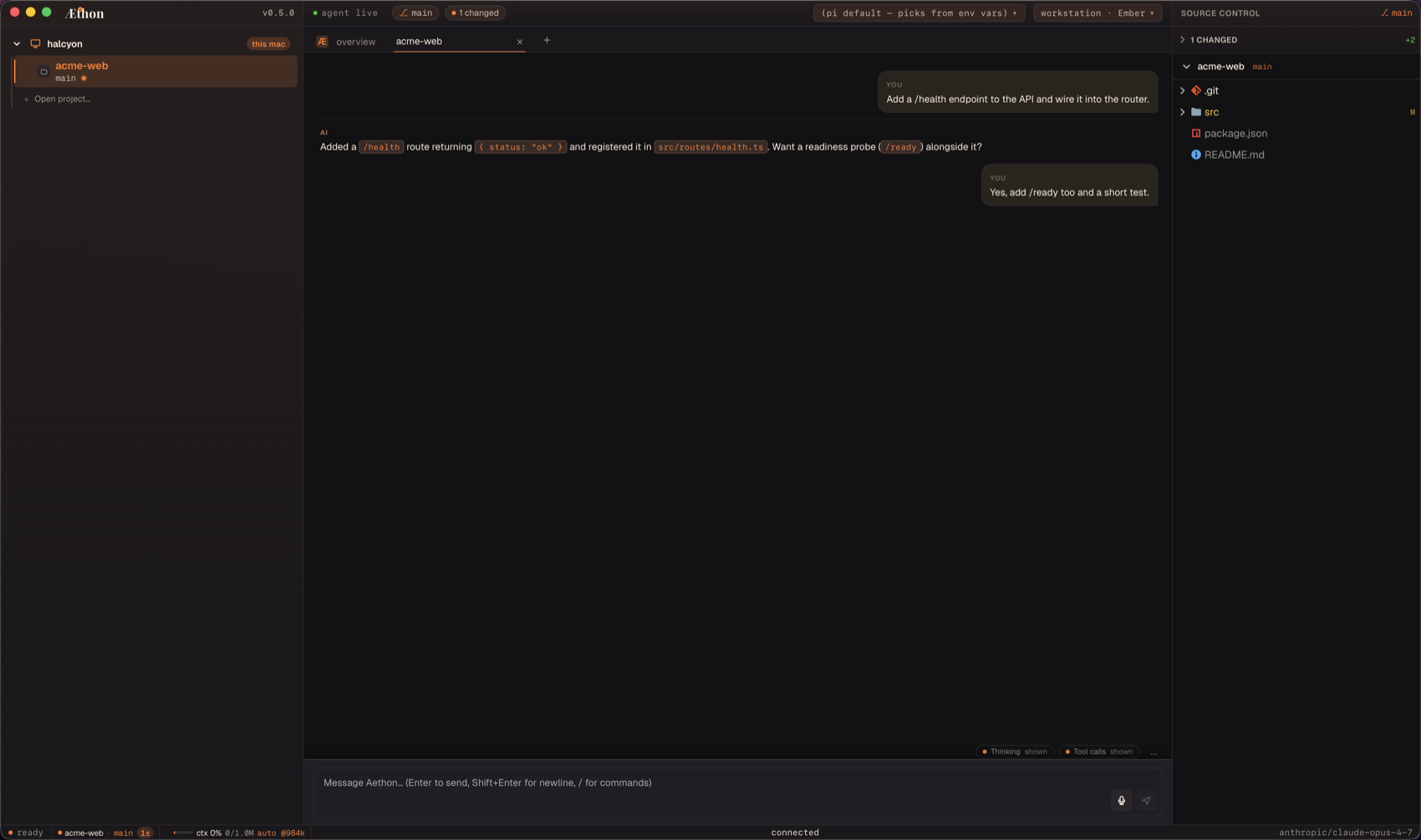
Agent tabs live in the top tab strip and host pi conversations. Each tab owns a chat history, draft, model selection, queued message counter, and bash output buffer — everything the agent needs to run a focused session.
Anatomy of an agent tab
Tab management
| Action | Shortcut | Notes |
|---|---|---|
| New agent tab | Cmd+T | Focus-aware: opens shell if focus is in the bottom panel. |
| New shell sub-tab | Cmd+Shift+T | Always opens a shell and opens the bottom panel. |
| Close tab | Cmd+W | Shell tabs prompt before killing a running job. |
| Reopen most-recently closed | Cmd+Opt+T | Restores chat + cwd + draft. |
| Next / previous | Cmd+Shift+] / Cmd+Shift+[ | Cycles agent tabs. Matches the iTerm / Terminal.app convention. |
| Jump to N | Cmd+1 … Cmd+8 | Index 1 = first agent tab. |
| Jump to last | Cmd+9 | |
| Move tab right / left | Cmd+Opt+] / Cmd+Opt+[ | Reorders the strip. |
When focus is inside the bottom terminal panel, the same shortcuts cycle shell sub-tabs instead — see Shells & share modes.
Per-tab state
Aethon persists each tab to ~/.aethon/state.json:
- Project (
cwd) — immutable for the tab's lifetime. - Model — the model picked for this tab. Defaults to
[agent] model. - Draft — whatever you typed but didn't send.
- Queue count — messages queued for the next turn.
- Bash buffer — recent stdout from the bash tool, surfaced in the bottom panel's "Agent bash" sub-tab.
- Pi session id — pointer into
~/.aethon/sessions/<tabId>/.
All of this is persisted and comes back on next launch — tabs and their sessions are restored per workspace.
TIP
The legacy [ui] restore_tabs key is vestigial: it is still parsed but has no runtime effect, so there is no toggle to turn restoration on or off.
Composing messages
The composer lives at the bottom of the canvas:
| Combo | Action |
|---|---|
Enter | Send. |
Shift+Enter | Insert newline. |
Cmd+L | Focus the composer (or terminal in shell tabs). |
Cmd+. | Stop the current prompt. |
Cmd+K | Clear visible chat history (pi session preserved). |
Cmd+Shift+S | Export the chat as Markdown to ~/Downloads/ (agent tabs only). |
If you press Enter while a turn is already running, Aethon queues the message as a follow-up. Cmd+Enter / Ctrl+Enter steers the active turn instead.
Slash commands are recognised when typed at the start of the composer. A non-exhaustive sampling:
- Session:
/clear,/compact,/context,/session,/name,/rename,/export,/memory,/reset. - Agent behavior:
/model,/plan,/login,/init,/config. - MCP:
/mcp,/mcp-auth. - Scheduled tasks:
/loop,/tasks. - UI / project:
/theme,/layout,/terminal,/sidebar,/files,/extensions,/reload,/project,/help.
Unknown /<word> falls through to the model — useful when pi or an extension owns the command.
See the full slash command reference.
Queuing messages
If you type and send while the agent is mid-turn, the message is queued. The status bar shows queued: N. The next turn starts immediately after the current one ends. To cancel a queue, clear the composer or Cmd+. to stop and discard.
Scheduled tasks (loops)
A tab can run a prompt on a recurring schedule. Cmd+Shift+L opens the Scheduled Tasks panel; from the composer, /loop [interval] [prompt] starts a loop (omit the interval to let the agent self-pace, or /loop reuse <id> to adopt an existing one), and /tasks [list|run|pause|resume|cancel|delete <id>] manages them. See the slash command reference.
Switching models
/model opens the model picker in the active tab. The change applies to the next turn only — already-running turns continue on the previous model. The new selection is also persisted as the tab's default for subsequent runs (until you change it again).
To change the default model for new tabs, edit [agent] model in config.toml or use the Settings panel.
Tool execution
Pi's tool calls (bash, file reads, file writes, web fetches) surface as A2UI tool cards in the chat. The card streams tool output as it arrives. Bash output is also mirrored to the "Agent bash" sub-tab in the bottom panel so you can keep watching it while you scroll chat.
Tool cards collapse by default when their tool finishes — click the chevron to expand, or set the cursor inside one to keep it open while you scroll.
While a turn is running, Aethon shows a short activity line in the chat and mirrors the same state in the footer. It summarizes the active work ("Reading directory contents", "Running checks", "Writing response") instead of flashing raw tool calls. Completed file edits render as an "Edited files" disclosure; collapse it to hide the whole file list, or open individual/all changed files from the card.
Turn actions
Every completed turn can be forked into a new tab from that point in the conversation. Forking is local and should open quickly even while another agent tab is busy. Rollback is only shown where it can sensibly truncate the current conversation; fork remains available anywhere a branch point exists.
Where to next
- Shells & share modes — bottom-panel PTY tabs.
- Command palette — files on
Cmd+P, commands onCmd+Shift+P. - Settings & search — cross-session search.