
Desktop App
Looking for Mold on mobile?
The remote-only companions have dedicated iPhone and Android guides with download, pairing, and setup instructions.
Two desktop apps on the Mac
This page covers Mold Desktop, the app that runs on Mac, Windows and Linux. On a Mac running macOS 26 you can also use Mold Studio for Mac, built natively for macOS; the two install side by side. Which one?
The Mold desktop app runs on macOS, Linux, and Windows. It puts making a picture, the queue, everything you have made, your styles, your machines, and settings in one focused window, in plain words, with five themes that keep attention on your work.
INFO
The desktop app lives in desktop/. Local generation uses Metal on Apple Silicon and CUDA on x86_64 Linux and Windows. On a machine with no supported GPU (an ARM64 Windows laptop, for instance) the app still runs and connects to a remote mold serve machine.
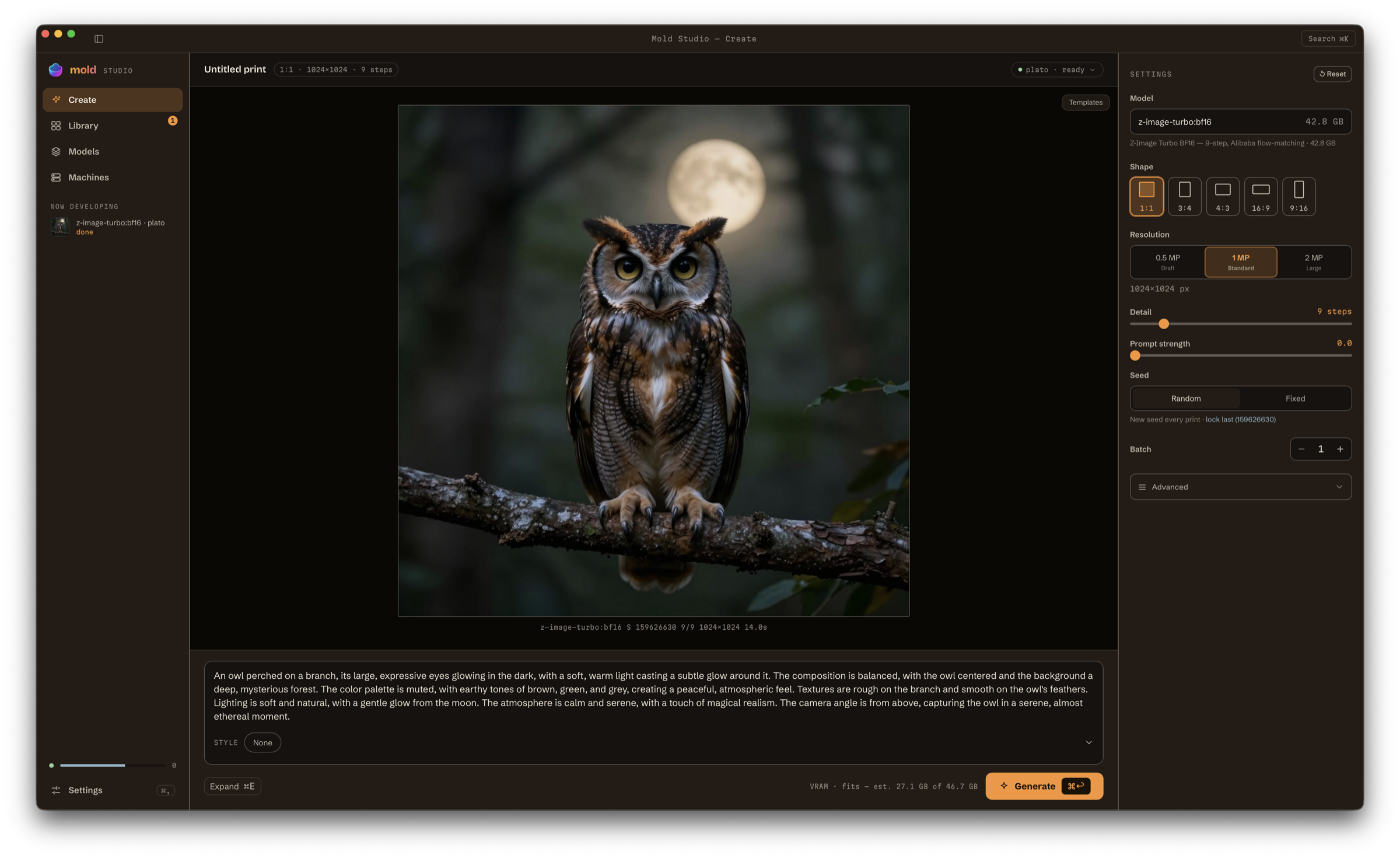
Mold Studio's New image workspace keeps the canvas, prompt, model-aware controls, machine status, and live generation progress in one native window.
Original source media
Use View (native apps) or View original (web, desktop and mobile) beside an attached input to inspect it without replacing or removing it. References, source/target pictures, boundary frames, masks, control and identity pictures, and attached video/audio have separate viewing actions. Image previews fit the whole picture. Use Actual size on desktop and web, or pinch to zoom in the native iOS app, for close inspection. Done or Escape returns to the attachment or picker. Picker previews do not select or attach the picture. Queue viewing actions show the full submitted media, which may already have been fitted to the generation canvas; older machines without the original-input endpoint report it unavailable.
Open a print's details to see the original inputs retained by its machine. Image inputs have thumbnails and role labels; audio, video and other files have named tiles. Use as source attaches an individual input to a new creation using the selected model's supported input flow. Reuse settings still restores the complete original recipe.
Open Library → Source Media to browse sources independently of their original print. Identical verified source bytes share one card. Its usage chooser keeps every input role, owning print and machine accessible; reuse takes the selected usage from that machine. Older machines without verified digests keep separate entries. In-memory previews and incremental inventory loading speed up return visits. Refresh sources checks for newly retained inputs. Machine filters and hidden collections keep the same library visibility. The browser checks owners in batches; search covers the loaded sources and Check more library items continues through the library.
Sources have no separate upload, pin or delete action. They remain retained while an owning print exists, including in Trash, and permanent deletion releases only that owner's retention. New creations using a source establish their normal retention when published.
The desktop sidebar also expands Library and Collections, with named collection rows, counts and availability, creation and management actions, and drag-to-file. The existing collection shelf and filters remain available.
Download
 Mold Desktop for MacApple Silicon · macOS 12+
 Mold Desktop for WindowsSelf-signed NSIS installer · x64
 Mold Desktop for Linuxx86_64 · for remote GPU machines
Every tagged release ships the Mac DMG signed, notarized and stapled: open it and drag Mold.app to Applications; no quarantine step is needed. It sits beside Mold Studio.app if you also use Mold Studio for Mac. Nightly builds, version-pinned downloads and SHA256SUMS are on the Download page and the releases page.
The Windows installer and CLI are self-signed CPU/remote-client builds, published with every tagged release and nightly by the Windows Nightly workflow (.github/workflows/windows-nightly.yml) to the rolling latest prerelease; the Desktop workflow additionally keeps a 14-day CI artifact of the same installer. Follow the Windows trust instructions before running them; there is not yet a publicly trusted Windows installer. The Windows CLI installation steps cover PATH setup and connecting to a GPU host.
The Linux download is a GPU-free archive for remote GPU hosts, mold-desktop-x86_64-unknown-linux-gnu-cpu.tar.gz (a usr/ tree with the binary, launcher entry and icons); on Arch it is the mold-ai-desktop-bin AUR package. For local CUDA generation, install mold-ai-desktop from the AUR (see Arch Linux / AUR) or build with Nix: nix build .#mold-desktop produces the sm_89 package, with .#mold-desktop-sm86 for RTX 3090/A40 and .#mold-desktop-sm120 for RTX 50-series. B200/sm100 is server-only; the desktop connects to it remotely. desktop-build produces the native package on NixOS and a CUDA AppImage on conventional Linux; tagged releases do not publish the AppImage.
What it is
A single native window that puts the full mold workflow behind a keyboard-driven UI, instead of the CLI or the browser SPA. The same mold-ai-server HTTP + SSE surface powers it, so anything the app does maps to a documented endpoint.
The window is one unified toolbar, a sidebar, the view, and a status bar. The sidebar names its destinations in plain words — New image, Queue, My images, Styles, Machines (⌘1–⌘5) and Settings (⌘,) — and keeps the queue under the machine that is making images, so work in progress is always in view without leaving the picture. Technical truth stays beside every plain label in mono (flux-dev:q4, 28 passes, 14.9 / 24 GB), the status bar always says which machine, how full, and how deep the queue is, and every overlay — the ⌘K palette, the lightbox, dialogs, toasts — is built on the same six-theme design system. The guide below uses those names; the web studio and the phone keep Create / Library / Models until their own redesign.
Features
New image (⌘1): a capability-driven inspector that shows only the controls a model's family supports (negative prompt, scheduler, CFG++, add-on looks, img2img source/mask/control, video frames/fps/audio). It reads as groups rather than knobs: Start from a photo with Paint a mask and Use a face beneath it, a Quality row of Draft / Good / Best built from the ladder the model recommends (about half, its default, and one and a half times), the sliders, Add-on looks, a 3-D object card offering Rough / Normal / Fine, a Clip card holding length and sound (and Smoothness in clip mode), Repeat this look, and Where it runs. What to make — Still picture, Short clip or 3-D object — is the one control in the view toolbar. Starters shows your saved starting points as cards, with the manager behind Edit…, and Recent lists the pictures you have made; clicking one brings back everything it was made with and puts the picture itself on the canvas, exactly as Use these settings again does from My images. A finished picture's caption names its file and size and offers Save, Make 4 variations (⌥↩), Make bigger, and the rest behind ⋯. Styles are selected and shown throughout the queue, downloads, print metadata, and machine details by their human-readable catalog names even when their stable internal generation ids are
cv:orhf:. For video-only LTX-2 community checkpoints, Mold disables generated audio when the installed files lack an audio VAE or vocoder while keeping image-to-video available. Generation is visualized as a print developing: a deterministic grain field, seeded from the job's real seed, resolves in lockstep withDenoiseStepevents. Batches run sequentially withbase_seed + i, and a VRAM preflight forecasts fit before you press Generate. Drop a PNG or JPEG from the file manager onto New image and it lands on the well under the cursor; Mold images with embedded generation metadata also restore their complete saved settings. Prompt expansion follows the directly editable Batch count: Batch 1 is a quick rewrite with undo, while Batch N greater than 1 prepares exactly N distinct editable variations before generation. Counts above eight start with a compact first-eight review and bounded Review all pages. Mold shows and freezes the resolved host for expansion and every sibling. One reviewed set may contain up to 10,000 variations as a memory-safety boundary; the number of sets you can queue is not limited. Every print (Batch 1, Batch N, and each prepared variation) is admitted through one durable/api/generation-batchesoperation, chunked at the machine's advertised limit; held children remain visible and retryable. A machine that cannot carry a request refuses it by name and queues nothing. Once the host accepts a batch, the composer is immediately available to queue another while the earlier work continues in the queue. When a Batch 1 rewrite becomes stale, New image immediately offers to re-expand the original for the current model and generate, generate the visible rewrite anyway, or restore the original; generation errors use larger copy with a copy-to-clipboard control. Source, model, host, or count changes keep Batch N reviewed work visible but require refresh or discard before it can run. Generation chrome uses human-readable catalog names while retaining stable IDs internally. My images shows each prepared print's durable batch identity and sibling position. When the expansion model is missing, the same inline area follows its pull on that frozen host through connection, queue, byte/file/ETA progress, readiness, or retry; it never redirects away from the composer or hides prepared work. The right settings inspector resizes from its left divider across 280–480 px, persists committed widths, and opens at 300 px; double-click the divider to restore that default. The Settings tab sits beside Starters and Recent. The essentials-only inspector stays compact by default. Toggle Advanced to extend capability-gated, always-open icon sections below those essentials in the same scrolling inspector; the canvas remains visible and edits apply immediately. A ↺ Reset beside the Settings header restores every generation setting to the selected model's defaults while keeping the prompt, the model choice, and any prepared batch size. For LTX-2, Advanced also exposes optional STG scale/blocks, CFG rescale, audio/video modality scale, and guidance skip stride. Empty fields preserve the selected pipeline's constants; invalid values block Generate inline, and starting points plus Use these settings restore recorded overrides.Short clip (inside New image): video is a setting, not a place. Switch the view toolbar's control to Short clip (File → New Clip and the ⌘K palette's Make a short clip land there too) and Create keeps the shape it already had — describe the clip, pick a clip style, drag the Length chip on the composer, press Generate. The chip reads
97f · 4.0sand snaps to the same frame grid the inspector's Clip card slider offers, because the two are one control shown twice. Ask for more than one render's worth and Mold splits the work into clips on the machine, carries the motion across each seam, and stitches them into one video — you get one clip and one entry in My images, and the progress line names the part it is on. Make is an ordinary batch count, so you can ask for four clips at once wherever the style allows it.The picker shows clip styles from every connected machine (choosing Short clip auto-picks one and remembers the style you last used there; switching back to Still picture restores a picture style; with none installed the menu says so and Browse more deep-links to the video filter), and limits, creation, events, previews, and job actions stay routed to the style's machine. An optional Opening image well (with its source strength and fit-to-frame controls) sits in the inspector's primary form exactly where one-shot source media lives (the header ↺ Reset clears it; the Advanced reset does not), and Advanced keeps the negative prompt and camera motion. Job and action failures stay visible inline.
Queue (⌘2): the same line the sidebar shows, at full width. Three counts — Being made, Waiting, Done today — one explainer, and a table with a sentence of status per row (Image · What's happening · Style · Machine). Drag a row to reorder it, or Jump the line on the one you need first; a waiting row's ⋯ offers Pause and Resume where the machine supports holding one job. Pause queue and Stop everything sit in the view toolbar (Stop everything asks first and names what it will stop), and Space pauses or resumes the queue from anywhere outside a field — on a machine that offers it, which is also where the status bar shows the hint. Closing the window keeps the queue running.
My images (⌘3): a justified, virtualized contact-sheet grid, with a Lightroom-style small-to-large slider in the view toolbar that resizes the contact sheet continuously and remembers its setting, NEW badges on fresh prints, a two-pane lightbox, and a History column holding Runs and Prompts. Space opens Quick Look, ←/→ navigate, and Use these settings jumps back to New image with every parameter restored. A print made scene by scene on an older build keeps its per-scene provenance, and Use these settings restores a plain clip built from its first scene's prompt. All merges every connected host without repeating matching saved prints, prefers the copy on This device, and labels every host where a print is available; source filters retain each host's full gallery. Still images offer full-resolution Copy image from tile and lightbox right-click menus. Use as source is offered wherever a print is shown — a tile, the lightbox, a run in the History column, and the finished render on the New image canvas — and loads that print back into the composer: a still becomes the source image (or the H3 first frame or ordered reference on those models), a clip becomes the source video, while audio and 3-D meshes are refused because neither is conditioning. The My images header is segmented Everything | Favourites | Albums | Trash, each with its own count. Everything and Favourites keep the grid plus a filter-chip row (tag chips ending in a + tag picker, then Made on and one chip per machine, in every scope); Albums puts its cover cards in a strip above the grid, which stays where it is, and each card drills in; Trash holds deleted prints under a banner that carries how long they are kept and a red Empty now behind a plain confirm, with a per-tile "Purges in N d" countdown and Restore / Delete forever. A favourite wears a ★ in the top-right corner of its tile, and a clip, a 3-D model, or a sound says so in a word at the bottom-left ("clip 5s", "3-D", "audio"). Selecting pictures opens a bar reading how many are selected, then ★ Favourite, Add tag, Add to album, Export… — which saves every selected picture where a single Save a copy would put it — and Delete. History opens as a column beside the pictures rather than over them, so the grid stays usable, and each past run shows its style, size, seed and time over a Use these settings line. Titles, ♥, tags, and album membership are edited in the lightbox aside; the raw filename becomes a detail line. Everything lives on the machine that holds the print (its
mold.db) and is merged across machines (collections by name, tags case-insensitively) and every change is applied to every copy of a print. Deleting moves a print to that machine's trash (the 6 s Undo stays); prints are purged after Settings ▸ My images & trash ▸ Keep deleted pictures for on this device (1 day … 1 year, or Forever) and after each remote machine's own setting in Machines ▸ machine ▸ Storage, which also shows "Prints in trash: N" and an Empty trash action. Naming a print starts in New image: the header's "Untitled print" is editable (click, Enter/blur commits, Escape reverts); the name travels with every sibling of that print, is restored by Use these settings, and leads the name suggested when you save or export ({title-slug}__{model}__s{seed}.{ext}; the stored file is never renamed). Filing starts in New image too: a File under group sits in the inspector between the essentials and Advanced, offering the print's own title as a removable tag chip, typed tags with suggestions drawn from every connected machine, and a collection row that pre-selects, but never creates, the collection whose name matches the title, with a picker for the fleet's collections and an inline New album…. A line beneath previews the filename the print will land as. The choice rides the one shot, every sibling of a batch, and every prepared variation; Use these settings restores it, and Settings ▸ My images & trash ▸ Tag new prints with their title turns the title chip off without touching prints you already made. Older servers without organization simply hide these controls and keep the previous delete wording.History (a column inside My images,
?panel=history): a fast, searchable list of past prompts from every ready machine, with Runs and Prompts as tabs in the column body; ↩ refills the composer, while Up/Down recalls the same merged history inline. It opens beside the grid rather than over it, so the pictures stay clickable. It renders the 200 newest entries and says so when there are more. This column is desktop-only; the web app has no History panel.Styles (⌘4): one searchable styles workspace whose view toolbar carries Ready to use | Browse more, the kind filter (All / Pictures / Clips) and Filter…. Ready to use opens with a disk-used-by-styles meter — one segment per family, counting each style's own weights so a shared helper is never counted twice — and is headed once by a mono column row — NAME · GOOD FOR · SIZE · MACHINE — that every row below it shares, so each row's ⋯ sits on the same line whether or not the row also offers Get it or Unload. Behind ⋯ sit the style's page and Remove from disk…. Browse more is the live Hugging Face/Civitai catalog merged with what you already have, source chips (All / HuggingFace / Civitai), a model-kind chip row (Models, LoRAs, CLIP, text encoders, VAEs, tokenizers, ControlNet), an 18+ NSFW tag with its own include checkbox, and sorting by downloads, rating, or recency, in compact Grid and Table layouts. Get it is the one acquisition verb on both tabs. Active downloads pin above both tabs and stay put while the list scrolls, reading as a sentence with the CLI progress line — bytes, rate, eta — beside it, and naming the machine receiving the download. The desktop reuses cacheable 512 px Civitai thumbnails across both layouts, lazily decodes them, and contains each card's layout and paint work. Missing previews use a local model-family mark, with no additional image request. Grid cards and table rows carry the same kind badge, and mature entries use an explicit 18+ NSFW label. The detail drawer repeats those classifications and surfaces available description, tags, license, source, format, and popularity metadata. The catalog renders SIZE vs FETCH honestly, with the primary weight label named for the actual kind instead of assuming every entry is a checkpoint. With several machines connected, Get it asks which one should store the style, and each machine's inventory refreshes when its download completes. Ready to use merges every ready machine with per-machine badges and routes its actions to the machine that owns the row. Primary model weights are labeled separately from the larger footprint with shared runtime (text encoders and VAEs), so shared dependencies are not mistaken for checkpoint size. Curated manifest variants take precedence over ambiguous multi-checkpoint Hugging Face repositories, preventing a whole repository from being presented as one oversized download. Live Hugging Face LoRA collections likewise select one runnable adapter variant instead of summing mutually exclusive adapters and fused checkpoints. A machine that accepts a download without returning any queued job is reported as an error. New image's clip and video empty states deep-link straight to Browse more with the video filters set.
Machines (⌘5): a list beside the machine's own page — This device first, then connected machines, any rented pods with their cost meter, Remembered, On your network, and the Rent-a-GPU offer. Landing on Machines opens the one the app is already talking about. Connect a machine is a single dialog (the machines found on your network, or a typed address, an API key when the machine asks for one, and "Make images here from now on"), never a stepped wizard, and Settings keeps only a doorway to this workspace. See How it connects for what a machine's page shows.
Waiting on this machine (inside each machine): running and waiting jobs, pause/resume, cancellation, and queue capacity live with the machine that owns them; the Queue view (⌘2) is the same line across every machine.
RunPod (inside Machines): secure account setup, balance and live spend, RunPod's own hourly rate on every card in the picker and in the "billing begins now" confirm, GPU and datacenter discovery, pod launch/lifecycle/connection, and persistent network volume create/select/rename/grow/delete. A selected volume is remembered, forces Secure Cloud in its datacenter, replaces the ordinary workspace disk, and cannot be deleted while attached to a pod. Because RunPod cannot stop a network-volume Pod, the app hides Start/Stop for those rows and explains that deleting the compute instance preserves
/workspaceon the volume. Logs use a supported handoff to the RunPod console rather than a nonexistent REST endpoint. Production network volumes accept 10–3999 GB; the form and native validation enforce that live bound before launch. Region selectors show both the geographic location and RunPod ID, while the volume form limits choices to datacenters that currently support persistent volumes. While a picture is being made on a connected running pod, the sidebar's queue shows the same live accrued-cost and hourly-rate meter as Machines.Settings (⌘,): a 200px jump nav beside one scrolling page of always-open sections — Look, Defaults for new images, Write more for me, Machines, Styles & disk, Style licences, My images & trash, Saving pictures & clips, Phone pairing, Speed & memory, Accounts & tokens, Cloud GPUs, Per-style defaults, Profiles, Advanced, and Updates & about. Typing in the search field narrows the nav and the page together, and no section hides behind an accordion — only Per-style defaults folds, one disclosure per style, because a machine reports eight rows for every style it has tuned. The web studio renders the same sections from the same schema (minus Saving pictures & clips) as panes: a browser page scrolls the window, so its nav opens one section at a time,
?section=addresses the one showing, and a search stacks every section that matches. Look holds the five themes and the Light or dark system appearance toggle; Machines keeps this device, its API key, and the Mold home, with connecting and forgetting other machines living in the Machines workspace; Styles & disk holds where styles are kept, where finished pictures are written, and how full that disk is; Style licences lists each licence as one row led by the styles it unlocks, in plain words, with its state and a single action; Speed & memory exposes theMOLD_*engine knobs as real controls, applied on engine restart; Accounts & tokens keeps Hugging Face and Civitai keys in an owner-only local file under the app's data directory (no Keychain prompts; exported to the engine asHF_TOKEN/CIVITAI_TOKEN); and Advanced carries every remaining/api/configrow with its provenance tag (⌂ db / ⛁ file / ⚿ env), where environment-overridden rows are locked with the variable that owns them. Settings also shows the effective Mold home (the shared root holding config, the SQLite DB, models, outputs, and logs) with a native folder picker or typed path. Changing it offers a recommended copy-everything migration. Mold validates and stages the copy without overwriting a non-empty destination, preserves the old root, and relaunches only after the new location is ready. You can instead use the selected location as-is, and an unavailable external drive appears as a recoverable offline state. The choice is stored outside the selected root, so the CLI, server, and desktop all resolve the same root (an explicitMOLD_HOMEenv override still wins). About credits core contributors James Brink and Jeffrey Dilley in both the Settings workspace and the native app menu.Command palette: Cmd/Ctrl+K for navigation, actions, style search, and prompt-history search in one field. Each row shows its shortcut on the right and its group on the left — make, queue, go, styles, machines — so Generate from these words, Make 4 variations of the last picture, Pause the queue, Connect a machine…, Download a style… and Rent a GPU… are all one search away. Style search covers the whole fleet: a style this machine has reads Use
<name>, one that only another machine has reads Use<name>· on<machine>and repins generation there when you pick it, and a style nobody has yet appears from the live catalog as Install<name>· not installed and queues the download. The palette picks the target itself and names it in the toast; open Styles when you want to choose the machine explicitly.Notifications bell: in the title bar next to Search, with an unread badge. Toasts stay transient, but the bell opens the durable session history of every toast; complete untruncated messages and error bodies, per-host context where known, timestamps, and collapsed ×N repeats (newest first, capped at 100). Severity is color-coded (green for an ordinary notice or a success, yellow for a warning, red for an error) with the severity also named for screen readers and carried by its own glyph, and the unread badge takes the worst unread entry's color, so a bell holding only notices reads green. Each row has a Copy button that puts the message, its full body, and the machine/time line on the clipboard; the app chrome is not selectable, so that button is how a long server error leaves the app. Opening the panel marks everything read; Clear empties it.
Native desktop integration: platform menus and shortcuts, Linux and Windows native window decorations, macOS overlay chrome, and background notifications on generation and pull completion. macOS uses UserNotifications so a signed release inherits Mold's bundle identity and app icon; Windows uses a WinRT toast whose click routes to the print, model, or update the alert names, exactly as the macOS and Linux notifications do.
Updates
This section describes Mold's in-app desktop updater. Automatic signed desktop updates are currently macOS-only; Linux Nix/AppImage builds and Windows installer builds report updates as unsupported and are replaced manually. The iPhone app updates through TestFlight after mobile-relevant main changes pass iOS CI, App Store Connect reports the build VALID, and internal tester access is verified.
Signed desktop builds keep update checks separate from installation. Mold makes a best-effort check after the app opens, and Mold → Check for Updates… plus Settings → Updates → Check for updates run the same check manually. A check only reports what is available: Mold does not download, install, or restart until you explicitly choose Update and restart.
Choose the release stream in Settings → Updates:
- Stable (default) follows tagged, production releases.
- Nightly follows signed and notarized builds from desktop-relevant commits on
main, after both desktop frontend and Rust CI gates pass. Nightlies expose changes sooner and may contain regressions.
Both channels use public, HTTPS-hosted manifests:
Startup checks are non-destructive. When an update is available, Mold shows a persistent banner in the app; if Mold is backgrounded it also sends a native notification. Download and installation begin only after you choose Update and restart.
Tauri's updater signature check is mandatory. Before the installed app is changed, the complete archive passes Minisign verification against Mold's embedded public key and is fully extracted into temporary storage. Mold rejects unsafe paths and extra app bundles, binds the bundle identifier and version to the manifest, runs strict Apple code-signature verification and a Gatekeeper assessment, validates the currently running bundle, rejects DMG or translocated launches, and proves the install directory can be replaced. Downloads stop cleanly after 15 minutes.
Only after every preflight check succeeds does Mold use macOS's atomic bundle exchange and restart. Mold does not run a post-launch health watchdog or roll back after a few seconds: the update either verifies and installs, or it fails before installation and the running version remains in place.
Switching from Nightly to Stable changes which manifest Mold checks, but never silently downgrades the installed app. If your nightly version is newer than the latest stable version, Mold reports Stable as current until a newer tagged release is published.
Keyboard map
| Shortcut | Action |
|---|---|
| Cmd/Ctrl+1–5, comma | New image / Queue / My images / Styles / Machines / Settings |
| Cmd/Ctrl+K | Command palette |
| Cmd/Ctrl+N | New image (clear composer, focus) |
| Cmd/Ctrl+Enter | Generate (in Short clip, make the whole clip) |
| Alt/Option+Enter | Make 4 variations of the finished picture (not in a field) |
| Cmd/Ctrl+E | Write more for me |
| Cmd/Ctrl+R | Surprise me (a new seed) |
| Cmd/Ctrl+. | Stop the image being made |
| Cmd/Ctrl+\ | Toggle sidebar |
| Space | Pause / resume the queue (where the machine offers it) |
| Space | Quick Look in My images, which keeps Space for itself |
| ←/→ | My images: navigate |
| Cmd/Ctrl+F | My images: focus the search field |
| Cmd/Ctrl+A | My images: select every picture the filters show |
| ⌫ | My images: move to trash (Undo for 6 s) |
| Cmd/Ctrl+⌫ | My images: delete forever (confirm) |
| F | My images: favourite / unfavourite |
| T | My images: tag the selected print |
| Shift+Cmd/Ctrl+N | My images: new album |
| Shift+Cmd/Ctrl+C | Copy seed (lightbox) |
| Cmd/Ctrl+0 / + / − | Interface size reset/larger/smaller |
Interface scaling applies to the complete app, including fixed overlays and right-click menus. Choose 80–130% from Settings → Look → Interface size, or use the View menu and keyboard shortcuts. The selected level is restored on the next launch.
Look offers five Mold Studio themes — Mocha (the default), Safelight, Blueprint, Graphite and Nebula — each in a light and a dark tone. Each card shows a band of that theme's own surfaces above its name, and the type pairing it brings; every theme also brings its own corner radius. A card names the theme and never a tone, because the tone is a separate System · Light · Dark control beneath: choosing a theme keeps the tone you are in, and choosing a tone keeps the theme. On System the app follows macOS between that theme's own two tones, so the theme you picked is never swapped for a different one. Saved choices from earlier releases migrate to the nearest theme (Safelight stays Safelight, now with a light tone of its own; Porcelain becomes Graphite's light tone; System becomes the System position). New iPhone installs start with Safelight (see iPhone → Settings). Every theme keeps text and interactive boundaries at WCAG AA contrast; an empty generation canvas follows the selected chrome, while actual generated media remains on a color-stable viewing surface.
Starting points
Save the settings you have now as a named, recallable starting point. Open the inspector's Starters tab, click Edit… to reach the save/search/sort manager, give the current settings a name, and it becomes a card you can load, rename, or delete later. A card carries its style's family mark rather than a picture, because a starting point's media is conditioning input, not a result. Loading one restores every parameter (style, prompt, dimensions, detail, guidance, scheduler, add-on looks, and the rest) in one click.
Starting points capture parameters, not media: source, mask, and control images (and LTX-2 source video / keyframes) are referenced but never stored, so after loading one that used them the app reminds you to re-select the files. If the starting point's style isn't installed you still get its settings, with a prompt to download it.
They are stored locally in the app and never shared with the browser SPA or synced to the server. Desktop and iPhone maintain separate device-local libraries; one saved on the desktop does not appear automatically on the phone.
Device placement
Settings → Advanced → Device placement saves a per-model default for where a model's components run. Pick an installed model, then set its Text encoders (the Tier-1 group knob covering T5, CLIP, and Qwen encoders) to Auto, CPU, or a specific GPU. For Tier-2 families (FLUX, Flux.2, Z-Image, Qwen-Image) an Advanced disclosure exposes per-component overrides for the transformer, VAE, and each text encoder; any encoder can also be left to follow the group knob.
Save as default persists the choice for that model and Clear removes it. Placement is applied the next time the model loads, so save it before you generate. GPU choices come from the connected engine's live device list.
This is the desktop surface for the same mechanism the CLI's --device-* flags and MOLD_PLACE_* variables drive; see Configuration → Per-component device placement for the full component list and semantics.
How it connects
The app talks to a mold-ai-server over localhost HTTP + SSE using the same wire types as the CLI and web UI:
Built-in engine and LAN server: embeds the server in-process and runs on Metal on macOS or CUDA on Linux, so no separate
mold serveis required. It listens on port 7680, advertises itself over mDNS, and is always the app's own engine; This device in the machine list. The Machines workspace exposes the persistent per-device API key that another Mold client needs to connect. If an unrelated process owns 7680, Mold uses and advertises an ephemeral port instead.Existing server: auto-detects a running
mold serveonlocalhost:7680.Machines (remote GPU boxes (e.g. a Linux CUDA machine for LTX-2) are added in the Machines workspace: Connect a machine (the machines found on your network, or a typed address, plus "Make images here from now on"), a Connected list, Remembered hosts for one-click reconnect (each with its own API key, stored in an owner-only file under the app's data directory) never the macOS Keychain, so connecting never triggers Keychain prompts), and an On your network list of discovered servers. A bare hostname is enough:
hal9000expands tohttp://hal9000:7680. One physical server is one entry: hosts are deduplicated by the server's stable instance id, so a box reached by hostname, mDNS name, and IP address collapses into a single row whose name follows the server's hostname unless you rename it. There is no separate remote "mode"; installs that previously used a remote primary migrate automatically: the old primary becomes a connected host, keeps its API key, and stays the generation target until you change it. The network list uses the operating system's native DNS-SD browser on macOS, so advertised_mold._tcpservices share the same cache and interface handling as Finder anddns-sd.Generation controls (Shape and Resolution quick-select common, per-family model-native sizes (with manual width/height for anything else); Repeat this look is an explicit Keep | Surprise me pair with the seed in mono beside it and one-click "lock last"; Save every result is on by default, and switched off it sends each print straight to the trash after it lands, so a throwaway never clutters My images yet stays recoverable until the trash empties; the style picker offers only the styles the section you are in can make — picture styles under Still picture, clip styles under Short clip, 3-D styles under 3-D object — names that section above the list, marks each style's source (Hugging Face / Civitai / local) and ends in Browse more →, which opens Styles already filtered to the same kind, ready-to-use styles first; each section remembers the style it was last used with, so switching back to Short clip returns to the clip style you were on and the app reopens on the style and section you left; the VRAM badge states plainly what fits ("VRAM · fits) est. 2.3 GB of 64.0 GB").
Upscaling: pick a Real-ESRGAN model in Advanced ▸ Upscale to upscale every print as it develops (the engine pulls the model on first use and retains both the original and
-upscaledresult), or right-click any picture → Upscale; the result lands in this Mac's gallery. Make bigger under a finished picture runs the same flow against the machine that made it. Use these settings always restores the generation canvas, not the upscaled file's physical dimensions.A machine's own queue: a queue console for every connected machine: the full server-side queue (other clients' jobs included), live thumbnails and step progress for this app's own jobs, per-job cancel, drag-to-reorder (
PATCH /api/queue/:idwith a new position), Pause/Resume of a host's queue (the running job finishes; nothing new starts), a two-step Cancel all, and a "Finished this session" list with one-click reuse. Reorder, Pause, and Cancel all are feature-detected via/api/capabilities(queue.can_reordergates reorder), so older servers simply hide the controls. The same queue mirrors into the sidebar rail and the Queue view. Click a job to open its detail panel: the prompt, the settings it was submitted with, where it sits in line, when it was submitted, whether it survives a restart, and (for a job the machine has parked) the full reason and error with a Copy details button. A running job shows its live denoise preview there too. From the panel you can Use these settings (which opens New image with everything restored), Cancel the job, or Retry one this app submitted that the machine parked. A job that has only just been accepted may not show its settings yet (the machine lists it before it loads the request) and the panel says so rather than pretending they are missing.History (a column in My images) (two lenses: Runs, every finished generation with its thumbnail, style, size, seed, and clock — click to reuse the full settings including the seed — and Prompts, the raw prompt log, searchable, for prompts whose outputs are gone). The tab is in the URL, so
?panel=historyopens straight onto it.Remote prints saved locally: generations from remote machines and RunPod are also written into this Mac's output directory (Settings → Look → "Save remote prints locally", on by default), with embedded metadata intact, so My images stays the complete record even when the GPU lives elsewhere. The tile's right-click menu adds Save to this Mac for pulling any older remote print down on demand.
Several hosts at once: alongside this device, any number of remote hosts can be live simultaneously (Connect a machine in Machines, or Connect beside a machine found on your network). With more than one live machine, the Where it runs chip at the right end of the New image toolbar opens a machine menu: pick one explicitly, leave it on Auto to route each batch to the least-busy machine by live queue depth, or choose Most capable to always target the strongest GPU (CUDA over Metal, then most VRAM, then shallowest queue). Both automatic modes prefer machines that already have the selected style, and the style picker lists every connected machine's styles; one that only lives on a remote machine is tagged with the machine that has it, and routing there just works. Jobs stream progress from (and cancel against) the machine they queued on, so a long LTX-2 render on a CUDA box never blocks quick local prints. Connections are remembered and restored on the next launch.
New image waits for those remembered machines and their style inventories before deciding there is nothing installed. The “get your first style” screen appears only when every connected machine reports zero installed styles; a remote-only style is selected and routed without a local download.
A machine's own page: click a machine in the Machines workspace to open it: live GPU, CPU, and RAM telemetry, disk usage for the filesystem holding its styles and what its pictures take (live and in the trash, from the machine's own records), every GPU's utilization, VRAM and lifecycle state, current queue state, active download progress, and a freshly fetched inventory of the styles on that machine. Its toolbar says the machine in one plain sentence —
RTX 4090 · CUDA · on your network · up 6 days— beside Make images here, Rename, Open web UI and Forget…; the address, version and instance id live in the name's tooltip, and clicking the name copies the instance id. Each Right now tile keeps one short reading (14.9 / 24.0 GB,16 cores) with the card and its backend in the tooltip, and Downloads here is a compact readout — the style, its percent and eta, a meter, and one line saying what else is queued. Storage sits beside it with that machine's own trash retention and an Empty trash action. Each GPU can be enabled or disabled from the machine's page. This device also exposes the same controls under Settings → Advanced. A busy disable drains its current stage before the owner thread exits; enabling starts a fresh owner thread.Launch reconnect: every remembered machine is attempted immediately on every app launch, in parallel with This Mac. An unreachable machine stays in the Machines workspace as an errored row marked reconnecting…, and the 10-second status poll keeps probing it so it self-heals without any action from you. A machine that drops raises a yellow warning notification saying it is retrying. When it answers again that warning is withdrawn and a green Reconnected to
<machine>notification confirms it. The web UI behaves the same way.
Windows
Windows is a first-class desktop target: the same Tauri crate and the same Mold Studio frontend, rendered by WebView2 instead of WebKit. Both x64 and ARM64 (Snapdragon Surface devices) build and run.
Toolchain
scripts\windows.ps1 doctor checks the whole list and names anything missing with the command that installs it; scripts\windows.ps1 setup installs what it can. What it looks for:
| Component | Why |
|---|---|
| Visual Studio Build Tools (C++) | the MSVC linker and the cc builds inside the dependency tree |
Rust ≥ 1.93 (aarch64/x86_64-pc-windows-msvc) | the workspace MSRV |
| Microsoft Edge WebView2 Runtime | the webview the app renders in |
| Bun | the frontend build and test runner |
tauri-cli | cargo tauri dev / build (setup installs it) |
| protoc (optional) | required for the pulid face-identity feature |
| NASM (optional, x64) | openh264 builds a faster assembly path when it is present |
Commands
scripts\windows.ps1 is the Windows peer of the Nix devshell's desktop-* commands; the devshell itself does not run on Windows:
scripts\windows.ps1 doctor   # verify the toolchain, name what is missing
scripts\windows.ps1 setup    # install what doctor can install
scripts\windows.ps1 dev      # Tauri app with hot reload (Vite on :1430)
scripts\windows.ps1 ui       # frontend-only Vite server
scripts\windows.ps1 check    # rustfmt, clippy -D warnings, vue-tsc, prettier
scripts\windows.ps1 test     # cargo test (CPU) + vitest
scripts\windows.ps1 build    # NSIS installer plus the standalone Mold.exe
scripts\windows.ps1 bundle   # alias of build
scripts\windows.ps1 clean    # drop the desktop build outputs
scripts\windows.ps1 features # print the feature recipe resolved for this machine
The main artifact is mold-desktop-windows-x64-self-signed. It contains the NSIS installer and mold-windows-self-signing.cert.cer. The signature proves that an installer came from Mold's CI only after the public certificate has been trusted on that Windows account; it does not establish a publicly trusted publisher and does not suppress SmartScreen on a fresh machine. Inspect the certificate thumbprint before trusting it:
certutil -hashfile .\mold-windows-self-signing.cert.cer SHA1
# Expected: E8 DA 29 90 15 5C CC 6E 92 78 A8 31 90 08 A7 63 AC 5D FC 79
Import-Certificate -FilePath .\mold-windows-self-signing.cert.cer `
  -CertStoreLocation Cert:\CurrentUser\Root
Import-Certificate -FilePath .\mold-windows-self-signing.cert.cer `
  -CertStoreLocation Cert:\CurrentUser\TrustedPublisher
Get-AuthenticodeSignature .\Mold_*_x64-setup.exe | Format-List Status,SignerCertificate
Only install this certificate on machines where you explicitly trust Mold's GitHub release process. Remove it from both stores when that trust is no longer required. CI imports the password-protected PFX from the WINDOWS_CERTIFICATE and WINDOWS_CERTIFICATE_PASSWORD repository secrets, checks its pinned thumbprint, signs both mold-desktop.exe and the NSIS installer through Tauri, and fails closed if either secret or signature is missing. The retained private material must never enter the repository.
The feature recipe is resolved per machine and printed by doctor: CPU-only by default, cuda added on an x64 host with a CUDA toolkit, and pulid added when protoc is on PATH. MOLD_WINDOWS_FEATURES replaces the whole recipe; MOLD_WINDOWS_CUDA=1 and MOLD_WINDOWS_NO_PULID=1 each move one axis.
What is not there yet
These capabilities and gates are absent or intentionally excluded, and each says so by name:
- Generated AAC audio tracks. The
mp4feature pullsfdk-aac-sys, whoseFDK_archdef.hrecognises only GCC/Clang architecture macros and falls through to a#warning, which MSVC raises as the fatal error C1021 on x64 and ARM64 alike. Video renders and muxes normally through the pure-Rust writer; only an explicitly requested audio track is refused. - In-app updates. The updater's preflight is built around macOS bundle identity,
codesign/Gatekeeper, andRENAME_SWAP. Windows reports updates as unsupported and is replaced by re-running the installer. - The
h3/h3-private-uatfeatures. MiniMax-H3 is a CUDA/Metal surface whose private evidence capture is written against unix ownership semantics (/proc/self/statm, uid/mode identity), so those features do not compile for Windows at all. Nothing in the Windows recipe enables them. cargo test --workspaceis not the Windows gate:scripts\windows.ps1 testis. Besides theh3compile above, a handful ofmold-coretests assert unix path separators (should end with .mold/output) and fail on Windows onmaintoday, independently of any Windows work. The desktop crate, which is what the Windows app actually builds, passes cleanly.
Publicly trusted Windows installers are still to come; current release and main artifacts use the pinned self-signed certificate described above.
Notes for contributors
- The repository pins LF line endings in the working tree via
.gitattributes. Git's defaultcore.autocrlfon Windows would otherwise check the tree out as CRLF, which prettier rejects for every file. - On ARM64,
.cargo/config.tomlenables thefullfp16target feature foraarch64-pc-windows-msvc.gemm-common's inlinefmla v.8hrequires it and it is not baseline on Windows, so without the flag the build type-checks and then fails during codegen;cargo checknever sees it. - Enable Windows long-path support (
LongPathsEnabled). Cargo target paths in this tree get deep enough to matter.
Development
Run inside nix develop (the devshell wires up Metal or CUDA, Bun, Tauri, and Linux WebKitGTK/GStreamer dependencies):
On Windows the devshell is not available; use scripts\windows.ps1 instead; see Windows above.
desktop-dev        # Tauri app with hot reload (Vite on :1430)
desktop-build      # build Mold.app, a Linux AppImage, or the native NixOS package
desktop-release    # signed + notarized + stapled app and DMG, then verify
desktop-check      # CI gate: rustfmt, clippy, vue-tsc, prettier
desktop-test       # cargo test (CPU) + vitest
desktop-ui         # frontend-only Vite server (pair with a running `serve`)
frontend-bun-lock  # regenerate the repo-root bun.lock and bun.nix
ios-dev            # iPhone app with Tauri hot reload (Vite on :1431)
ios-run            # production-mode run on an iPhone or simulator
ios-check          # Rust check for the Apple Silicon simulator target
ios-build          # archive/export for App Store Connect
android-dev        # Android app with Tauri hot reload
android-run        # production-mode run on a device or emulator
android-check      # debug ARM64 APK from the shared mobile shell
android-test       # native instrumentation tests on an emulator
android-build      # ARM64/ARMv7 app bundles for Google Play
android-emulator   # boot the external-storage Mold_API_37 emulator
android-doctor     # verify Android Studio, SDK, NDK, AVD, and cache paths
On Linux, nix build .#mold-desktop builds the sm_89 native package, nix build .#mold-desktop-sm86 targets RTX 3090/A40, and nix build .#mold-desktop-sm120 targets RTX 50-series. CUDA_COMPUTE_CAP controls local dev/AppImage compilation. desktop-release remains the macOS sign/notarize path and intentionally exits on Linux.
The Rust crate under desktop/src-tauri is its own cargo root (excluded from the workspace); the frontend lives in desktop/src. CI runs the desktop-check and desktop-test gates via .github/workflows/desktop.yml, which also carries a windows-latest job that runs clippy, the tests, and the signing contracts, and builds the NSIS installer after merge on main (or on manual/nightly runs) — never on pull requests; PR-native feedback comes from the macOS desktop gate.
The separate remote-only iOS crate lives under apps/mobile/src-tauri; its shared frontend entry is desktop/src/mobile. Mobile CI runs through .github/workflows/ios.yml and .github/workflows/android.yml. See the repository's apps/mobile/README.md for native setup, simulator validation, icon guards, and TestFlight maintenance.
Signed distribution
desktop-release is the release-grade local path. It requires .secrets/signing.env (gitignored) with APPLE_SIGNING_IDENTITY and App Store Connect API credentials (APPLE_API_ISSUER, APPLE_API_KEY, and APPLE_API_KEY_PATH). The command builds the Metal-enabled app and DMG, waits for Apple notarization, staples the ticket, then verifies the hardened-runtime signature, entitlements, Gatekeeper acceptance, and staple on both artifacts.
CI runs the same signed distribution job from .github/workflows/desktop-distribution.yml. Tagged releases publish the Stable DMG, updater archive, signature, and mold-desktop-stable.json; desktop-relevant commits on main publish their signed Nightly counterparts to the rolling latest prerelease only after desktop CI passes. Both publication paths verify the archived app and updater signature against the exact public key embedded in Mold, then prove that the public manifest points at an anonymously downloadable payload before moving the channel pointer. Nightly publication prunes only old desktop assets after that verification and retains ten generations; unrelated CLI assets and the current manifest target are never selected.
Repository secrets hold the exported Developer ID certificate, App Store Connect key, and the Tauri updater credentials TAURI_SIGNING_PRIVATE_KEY and TAURI_SIGNING_PRIVATE_KEY_PASSWORD. Never print or commit the updater private key. Keep a controlled offline backup: losing it prevents already installed copies from trusting future updates. Key rotation must be staged by first shipping the replacement public key in an update signed with the existing key. Runner-only key material is written to temporary paths, and the temporary signing keychain is removed even if the build fails.
Attaching a first/start frame selects the closest supported aspect ratio from that image; adding a closing frame preserves it. Crop to fill is the default. The iOS aspect menu marks its current selection with a checkmark.
Queue rows show the owning machine’s sealed conditioning images across models. Job Details shows every ordered reference separately with its role, including identity photos, named views, masks, control images and boundary frames. Audio/video references are listed by kind; unavailable previews are disclosed. Inputs remain separate from live denoise previews and are fetched through authenticated routes, including work submitted from another device. Older servers retain their singular source preview.
Reuse input media
Reuse settings restores retained opening and closing frames into editable wells, preserving keyframe indices and ordered image references. Audio, source/continuation video, identity photos and control images restore with their saved settings where the selected recipe supports them. Continuation overlap and authored reference strength (including zero) are preserved. Older prints without recorded reference strength keep the server default. The original machine must retain the inputs; missing, damaged or oversized inputs are disclosed before generation. A new attachment or explicit removal wins over a late download, and restored wells never have a hidden archive fallback that can revive removed media.
Library deletion by machine
A Library machine filter scopes trash, restore, permanent deletion and Empty Trash to that machine. Copies on other machines stay in place. Choose All Machines to include every loaded copy. This applies to web, desktop and mobile Library views.
Selected Trash deletion requires a host with the trash-only deletion API; older hosts show an update request. On Tauri desktop, deleting selected local trash or emptying local trash requires the local engine to be running. Offline operations refuse rather than risking a restored live file.
Shared Library collections
All Machines keeps the merged library available. A machine filter shows that machine’s actual collection memberships, favorites, covers and counts. A collection absent from a successfully loaded inventory is labeled separately from an unavailable inventory. Collection hiding applies across matching slugs, including media whose copy on the selected machine has not been filed locally. Opening a hidden collection explicitly still shows its members.
Hide and Show apply to every known replica. Pending edits retry when the editing client reconnects; new collection replicas preserve the visibility setting. Copying media between hosts preserves its collection organization. Removing a copy from a machine leaves the copies on other machines intact.
Queue menus and touch swipe controls follow the owning machine’s current state and capabilities. Held jobs offer supported Retry or Download and Retry, transfer and Cancel; they do not offer Pause. On current Mold servers, Held cancellation retains its held-only safeguard through interrupted requests and app restarts. Offline, stopping, settled or currently updating rows retain inspection without unsupported mutation actions. Job Details distinguishes Stopping, completed, failed, cancelled and unknown states instead of labeling them Queued.
Local viewing history
Library New badges and unread counts are saved on each client independently. Media discovered after the initial machine baseline stays new during a Library visit. Individual viewer display clears one print immediately; leaving Library clears the eligible projections captured during that visit. Unvisited hidden or filtered-out media, Trash, and arrivals after departure remain unread. Merged copies count once; hidden collections and Trash do not count. Existing read history is preserved on upgrade. Native icon badges follow the same history, with the existing permission or preference controls. Browser, desktop and mobile-shell histories are separate. Storage errors are visible and preserve the previous saved history.
Move queued work to another machine
When another connected machine can generate, Move to… is available on queued, paused, and held jobs until the source machine begins rendering. The prompt, seed, settings, and retained reference media move together. The destination must accept the job before the original is removed. Older servers support Held-only moves. Jobs that depend on machine-local LoRAs or workflows are refused without moving them.
If a connection is interrupted during a move, retry the same destination so Mold can check whether it already accepted the job. The source remains reserved while that result is unknown, preventing duplicate rendering. A confirmed destination rejection releases the original only after the destination records that this transfer cannot be admitted later.
Editing long prompts
The compact prompt stays bounded while you type. Edit prompt opens a spacious live editor; Done, Escape and backdrop dismissal retain edits and return focus to the opener. Enter inserts a newline, and arrow keys move through text. Recent prompts searches full prompt text and replaces only the prompt, preserving model and other settings. Clear offers immediate Undo clear; a later edit or history choice ends that recovery. Expand and Remix use the existing rewrite flow and return to the editor. The editor never submits a generation shortcut. Phone presentation fills the visible viewport, with controls retained when the keyboard reduces the available space.
Deleting the media currently open in a Library viewer keeps the viewer open on the next surviving item in the current filtered order, or the previous item at the end. It returns to the grid only when no items remain. A surviving machine copy stays visible after a partial deletion failure. Native macOS successful moves to Trash finish without a persistent completion notice; progress, interrupted work and failures remain visible.
Automatic clip length
When the selected model advertises duration prediction, Predict duration lets the server choose a 1–20 second LTX 2.5 clip from the prompt. Turn it off to choose an explicit length. Native iOS and macOS expose the same choice as web and Tauri; unsupported or unavailable models keep explicit duration controls.
Picking video and audio files
Source-video, continuation-video and conditioning-audio picks must be nonempty and at most 64 MiB each. A file that cannot be read or exceeds the limit produces an inline message; the previous attachment stays in place. Picking another file, clearing the attachment or changing the model/pipeline prevents an earlier read from replacing the current input. Video and audio bytes are preserved as selected.