
File Editor
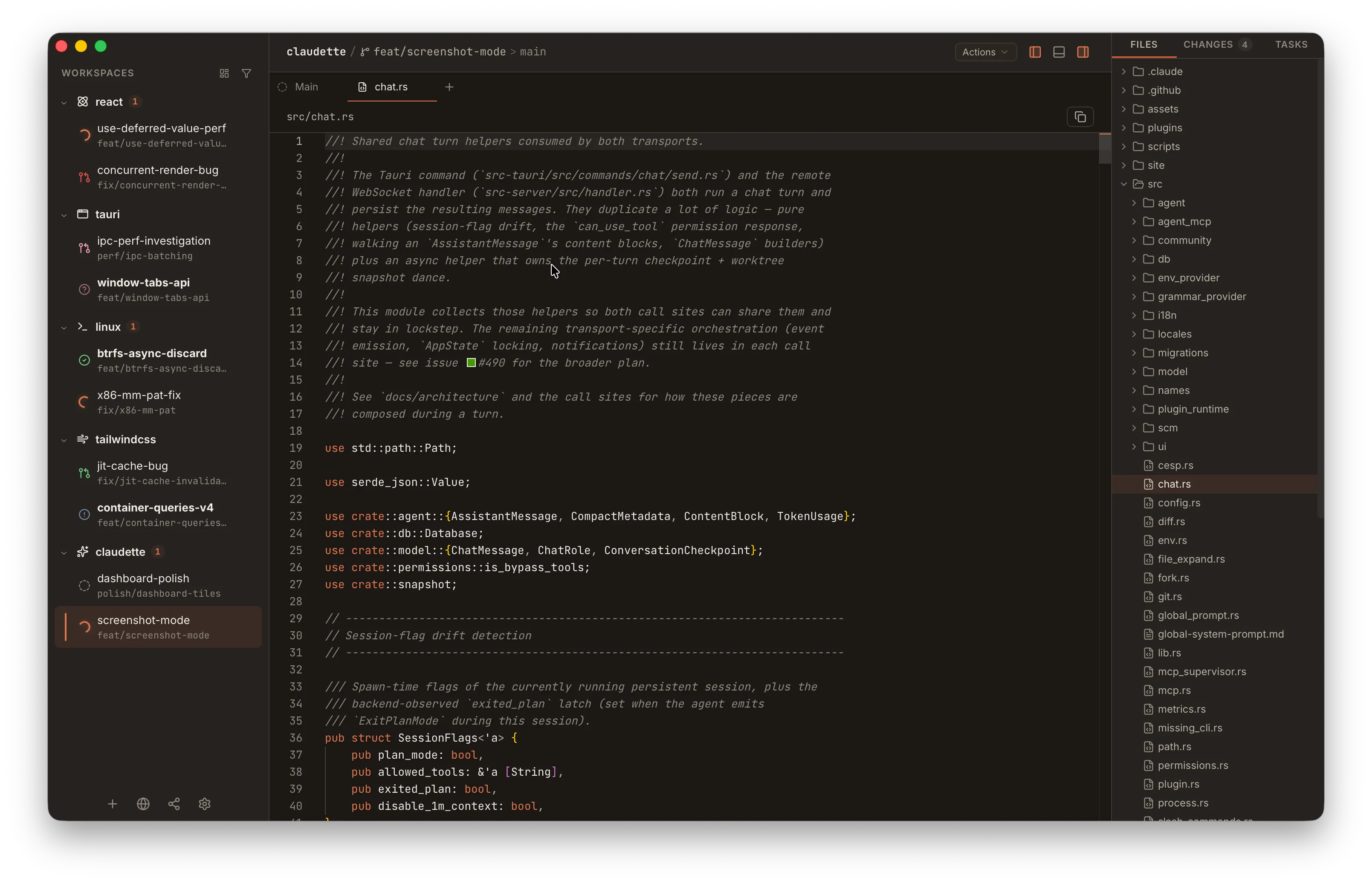
Claudette ships a full Monaco editor — the same code editor that powers VS Code — for opening and editing files in your workspace. It runs entirely offline alongside the agent chat, the diff viewer, and the integrated terminal.
Opening a File
Section titled “Opening a File”There are two main ways to open a file in the editor:
- From the Changes panel — click the Open in editor icon button (the file icon at the right edge of any changed-file row). Clicking the file path itself opens the diff for that file in a separate tab; the icon button is what lands you in Monaco.
- From the Files tab — switch to the Files sidebar to browse the workspace’s file tree, and click any file to open it in the editor.
Files open as tabs next to your chat and diff tabs, so you can hop between agent output, a diff, and the editor without losing context. Each file gets its own tab, and switching files inside that tab gives you a fresh undo history per file.
Agent-Managed Files
Section titled “Agent-Managed Files”Agents persist plans and memory notes outside your worktree — under ~/.claude/ (Claude Code) and ~/.codex/memories/ (Codex). When one of these paths appears in chat — in an Editing tool-call row, an agent message, or a plan card — clicking it opens the file directly in Monaco instead of failing the worktree path check.
Recognized locations:
| File | Location | Badge |
|---|---|---|
| Plans | ~/.claude/plans/**/*.md | Plan |
| Project memory | ~/.claude/projects/<project>/memory/**/*.md | Memory (or Memory index for MEMORY.md) |
| Other project notes | ~/.claude/projects/<project>/**/*.md | Project file |
| Codex memory | ~/.codex/memories/**/*.md | Memory (or Memory index) |
These tabs are read-only — they’re for inspecting what the agent wrote, not editing it — and the pane toolbar shows a badge identifying the file kind alongside its full path. Everything else (only those allow-listed directories, never arbitrary absolute paths) still goes through the standard worktree security boundary.
Read vs Edit Mode
Section titled “Read vs Edit Mode”Files open in read-only mode by default. Toggling into edit mode does not remount the editor — your cursor position, scroll offset, and undo stack are preserved as you switch in and out of edit mode.
Save with ⌘S on macOS or Ctrl+S on Linux/Windows. The shortcut is scoped to the editor — it only fires when the editor has focus, so it won’t collide with other panels.
Editor Menubar
Section titled “Editor Menubar”Above the editor, Claudette renders a compact File / Edit / View / Go menubar that surfaces the editor’s most useful commands without needing to remember Monaco’s keyboard shortcuts. The same items work whether the file is open in read-only or edit mode; items that don’t apply (Save on a clean file, Format Document on a binary) are disabled rather than hidden so the menus stay predictable.
| Menu | Items |
|---|---|
| File | Save, Revert to Saved, Reveal in Files Panel, Close File |
| Edit | Undo, Redo, Find, Find and Replace, Format Document, Copy File Contents, Copy Path, Copy Relative Path |
| View | Turn Word Wrap on/off, Show/Hide Minimap, Show/Hide Line Numbers, Zoom In/Out/Reset |
| Go | Go to File (⌘/Ctrl + P), Go to Line, Go to Symbol |
Reveal in Files opens the right-sidebar Files panel, expands the path’s parent directories, and selects the file. Copy Path copies the absolute on-disk path (joined with the workspace’s worktree root), and Copy Relative Path copies the workspace-relative form.
The View toggles persist across windows and restarts — Word Wrap, Minimap, Line Numbers, and Zoom are stored as app settings (editor_word_wrap, editor_minimap_enabled, editor_line_numbers, editor_font_zoom) and hydrate on startup. Zoom is clamped to a 0.7×–2.0× range; Reset Zoom returns the editor to 100%.
Theme Sync
Section titled “Theme Sync”Monaco’s theme follows Claudette’s app theme automatically. Pick a theme in Settings > Appearance and the editor restyles immediately, with no reload required. The same is true for dynamic colour changes — the editor observes the active theme and updates in real time.
See Theming for the full list of bundled themes.
Syntax Highlighting & Language Services
Section titled “Syntax Highlighting & Language Services”Language detection is automatic — Monaco picks the language from the file extension, so opening app.tsx gives you TypeScript, styles.css gives you CSS, and so on.
Dedicated language services run for:
- TypeScript / JavaScript — full type-aware highlighting and diagnostics
- JSON — schema-aware validation and formatting
- CSS / SCSS / LESS — property and value validation
- HTML / Handlebars / Razor — tag and attribute completion
Each language service runs in its own web worker, so typing latency stays snappy on larger files. Everything is bundled with the app — no CDN fetches, no network required.
Not the Diff Viewer
Section titled “Not the Diff Viewer”The Monaco editor is for opening and editing files. The diff viewer is a separate component that uses Shiki for syntax highlighting and is optimised for reviewing hunks of changed code rather than free-form editing. Both can be open at the same time as separate tabs.
Defaults
Section titled “Defaults”The editor ships with these defaults:
| Setting | Value | Toggle |
|---|---|---|
| Font | Default mono stack (matches the rest of the app) | — |
| Font size | 13px (Zoom 1.0×) | View → Zoom In / Zoom Out / Reset Zoom |
| Line numbers | On | View → Show/Hide Line Numbers |
| Word wrap | On | View → Turn Word Wrap On/Off |
| Minimap | Off | View → Show/Hide Minimap (also in Settings → Editor) |
| Sticky scroll | Off | — |
| Whitespace rendering | On selection only | — |