
SCM Providers
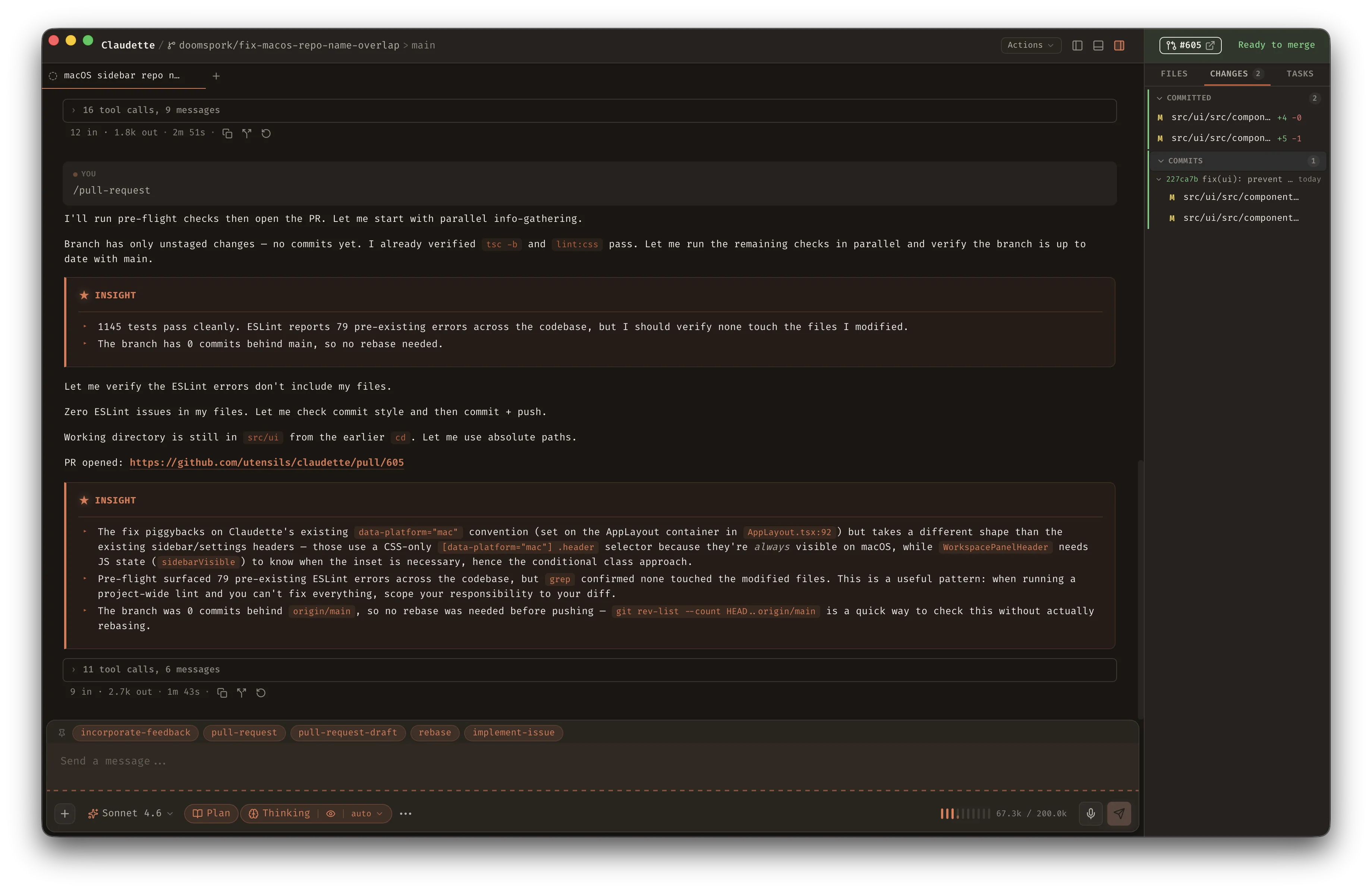
Claudette shows pull request state and CI check results for every workspace, right in the sidebar. No in-app sign-in required — it wraps the CLI tools you already have authenticated (gh, glab).
What You See
Section titled “What You See”Sidebar badges — each workspace displays a git icon indicating its PR state:
- Open — arrow icon, colored by CI status (green = passing, yellow = running, red = failing)
- Draft — dashed circle icon
- Merged — merge icon in purple
- Closed — closed-PR icon, muted
- No PR — dashed circle icon, muted
PR status banner — a color-coded banner appears above the right sidebar tabs showing the PR number (clickable), a status icon, and a human-readable label like “Ready to merge” or “CI failed.”
SCM tab — the right sidebar includes a dedicated SCM tab with:
- PR title, author, base branch, and a link to open in your browser
- A list of CI checks with individual pass/fail/pending status
- Create PR and Merge PR buttons for common actions without leaving the app
How It Works
Section titled “How It Works”Claudette auto-detects your SCM provider by matching git remote get-url origin against known hostname patterns (e.g., github.com, gitlab.com). A background polling loop fetches PR and CI data every 30 seconds across all active workspaces — no manual refresh needed.
All data is cached in memory, keyed by repository and branch. Concurrent CLI calls are capped at 4 to avoid overwhelming your machine.
Requirements
Section titled “Requirements”| Provider | CLI tool | Auth |
|---|---|---|
| GitHub | gh | gh auth login |
| GitLab | glab | glab auth login |
If the CLI isn’t installed or authenticated, the SCM tab shows a helpful status message instead of failing silently.
Auto-Archive on Merge
Section titled “Auto-Archive on Merge”Enable Settings > General > Archive on merge to automatically archive a workspace when its PR is detected as merged. The sidebar cleans itself up without manual intervention.
How Claudette decides the merge is yours
Section titled “How Claudette decides the merge is yours”A workspace’s PR is resolved by branch name — and merged PRs keep resolving for their branch forever, so the sidebar badge still renders after a merge. That creates a trap: a brand-new workspace whose branch happens to match an older, already-merged PR would otherwise be archived within a minute of its first prompt. Branch names collide more easily than you’d expect, because the first prompt of a workspace auto-renames its branch to a slug derived from that prompt — ask for something twice and you get the same slug twice.
Claudette therefore archives only when at least one of these holds:
- The PR merged at or after the workspace was created. The merge plausibly came from this workspace’s work.
- Claudette watched the transition. This app session polled the same PR number and saw it go from open or draft to merged.
Either signal is enough, which keeps the feature working in both directions: providers that report no merge timestamp are covered by the observed transition, and merges that happened while the app was closed are covered by the timestamp. A merged PR inherited purely through a branch-name collision satisfies neither, so the workspace is left alone and a declining auto-archive line is written to the log.
This matters most when Settings > Git > Auto-delete branch on archive is also on, since that upgrades the archive into a hard delete of the workspace record, worktree, and local branch.
Custom SCM plugins should return merged_at (RFC 3339) on merged pull requests so the timestamp check applies. Plugins that omit it still work — they just fall back to the observed-transition check.
Auto-Fix on CI Failure
Section titled “Auto-Fix on CI Failure”Enable Settings > Git > Auto-fix CI failures to automatically create a new agent session when a workspace’s CI changes from passing or running to failed. Claudette waits until checks have finished, applies the per-workspace cooldown, then opens a session with a prompt containing failed check names, links, branch and PR context, and failed log output when the provider supports it.
The bundled GitHub provider uses gh run view --log-failed; the bundled GitLab provider uses glab ci trace. Custom SCM plugins can opt in by declaring and implementing the ci_failure_logs operation. If a provider does not support log fetching, the auto-fix session is still created with the check list and URLs.
Custom Plugins
Section titled “Custom Plugins”SCM providers are Lua plugins that live in ~/.claudette/plugins/<name>/. Each plugin has a plugin.json manifest declaring which CLI it wraps, which hostnames it handles, and which operations it supports.
GitHub and GitLab ship as bundled plugins — they’re seeded to disk on first launch and kept up to date automatically. If you’ve customized a bundled plugin, your changes are preserved.
The plugin sandbox enforces strict security:
- CLI allowlist — plugins can only invoke the executables declared in their manifest
- 30-second timeout — per CLI invocation
- No filesystem or network access — all I/O goes through the host API
Environment Provider Plugins
Section titled “Environment Provider Plugins”The same Lua plugin runtime powers a second plugin kind: env-provider. Each env-provider activates when the workspace’s worktree contains the file or signal it watches for, then prepares the environment for processes Claudette spawns inside the worktree (terminals, agent subprocesses, MCP servers).
Bundled env-providers:
| Plugin | Activates when | Required CLI |
|---|---|---|
env-direnv | The worktree has an .envrc | direnv |
env-mise | The worktree has a mise.toml, .mise.toml, or .tool-versions | mise |
env-dotenv | The worktree has a .env file | None (parsed in-process) |
env-nix-devshell | The worktree has a flake.nix with a default devshell | nix |
Toggle individual providers in Settings > Plugins. Each plugin’s manifest declares any user-configurable settings, including per-provider timeout caps for slow cold starts.
For direnv, Claudette keeps the direnv allow safeguard content-aware. When you approve a blocked .envrc, Claudette records that file’s SHA-256 digest and can auto-allow future worktrees only when their .envrc content matches an approved digest. Editing .envrc changes the digest, so the next resolve prompts again before agents or terminals receive that environment.
For Nix devshells, terminals and agent harnesses do not consume direnv’s shell/profile-derived environment. When env-nix-devshell detects a flake.nix or shell.nix, Claudette enters the workspace through nix develop directly: terminals run plain nix develop, and agents run as nix develop --command <agent> .... This keeps the Nix devshell independent from env-direnv, even in repos whose .envrc also says use flake.
If a bundled provider’s required CLI isn’t installed (e.g. nix missing on a non-Nix host), Claudette marks it not installed in the Environment panel and silently skips it on every workspace spawn — no toast, no error. The toggle is locked in this state. CLI availability is probed once at startup, so if you install the underlying tool while Claudette is running, restart the app to pick up the change.
When Claudette creates a new workspace, the repo setup script (if any) runs first with the system shell environment — deliberately, so a setup script can prime env-provider state itself (direnv allow, mise trust && mise install, generate a .env from a template, nix flake check) before any provider tries to read it. Claudette then resolves the env-providers, and only after that does the workspace appear as ready. Selecting an existing workspace performs the same env warmup but skips the setup script (it already ran on create). In both cases, terminal tabs, agent subprocesses, and MCP servers wait for warmup before spawning. Non-Nix providers are applied as a merged environment; Nix devshell terminals and agents enter through nix develop directly.
The merged environment is cached per worktree and invalidated when watched files such as .envrc, mise.toml, .env, or flake.lock change. New terminals spawn with the refreshed env. Persistent agent subprocesses re-check the env before each turn and restart when provider output or provider evaluation metadata changes, so the next agent turn sees the updated shell environment. Already-running terminal shells keep their original process environment.
Drop your own env-provider into ~/.claudette/plugins/<name>/ (one plugin.json + one init.lua) and Claudette discovers it at startup.